

Winter '26 Release: dashboard redesign, smarter insights, AI re-ranking, editor updates
Our Winter Releases focused on providing auto parts merchants with better insights and building more tools to help them refine their fitment data into a cleaner and more competitive version. We’ve added a range of new reports to show what shoppers riding specific vehicles search for, as well as other insights. We've also improved the Fitment Editor to make large updates easier and introduced smarter search features that help customers discover the right products faster.
Fitment Editor Updates
We continued improving the Fitment Editor to help merchants manage fitment data faster and easier. Our team keeps refining the experience, and if you have ideas on what the Editor should do next, we’d love to hear them. Contact our support team and help us shape the next changes to the Editor.
[1] Lots of Bulk Actions
Managing fitment data no longer requires one product at a time. Now merchants can perform multiple bulk actions inside the Fitment Editor.
Add new fitments to multiple products simultaneously, rather than editing each product individually.
Find which products are associated with a specific vehicle, and understand why a particular model appears in the vehicle list.
Look for products that mention “F-150” in the product title but have no fitment data, and add F-150 as a fitment in one step.
Take all products that fit “2025 Ford F-150” and extend that fitment to “2026 Ford F-150”, without duplicating work.
We also improved how fitment years are displayed and edited. Instead of listing every year separately, the editor now groups them into year ranges. Merchants can easily adjust the start and end years as needed, which is especially helpful when extending fitments as new model years approach.
[2] Filters
Now you can view all products in your store alongside their assigned fitments inside the Fitment Editor. Also, we added Year-Make-Model lookup, filters, and a search bar, so you can easily navigate through them. You can sort products by category, brand, price, stock, fitment source, etc. Combine filters, find the products that need changes, and update them in bulk.
Shopify App
BigCommerce App
Analytics & Insights
[1] Dashboard got a new look
We’ve completely redesigned the Convermax Dashboard. The new layout is cleaner, more intuitive, and easier to navigate. Along with the redesign, we’ve also introduced several new reports to give merchants deeper insights into how customers search, browse, and interact with products in their store.
If there’s something you’d like to measure, track, or understand better, tell us. We’re continuing to improve our analytics tools, and your feedback is important to us. Many of the improvements we build start with ideas from merchants like you. Email us at team@convermax.com.
[2] Vehicle Search Queries Report
We’ve added a new Vehicle Search Queries report to the Convermax dashboard. It shows the most popular search queries filtered by vehicle, helping you understand what customers look for after they’ve selected a specific Year, Make, and Model. We hope understanding what customers search for after they choose a vehicle will help merchants improve product coverage and conversions.
There are two easy ways to use it:
• Open the Vehicles report and click the magnifying glass icon next to any vehicle. You’ll be instantly redirected to the Queries report, already filtered for that vehicle.
• Open the Queries report and use the vehicle dropdowns at the top to select the Year, Make, and Model you’re interested in.
Alongside this new report, we’ve made a small cleanup to the reporting section. We‘ve removed the YMM Timeline and renamed the YMM Report to Vehicles. This better reflects what the report actually shows, making reporting simpler and clearer.
[3] Products Report
We’ve added a new Products section to Convermax Reporting. It gives you more detailed insights into how your products are performing. With this update, you can answer questions such as:
With which vehicles was a specific product added to the cart?
How many times was it viewed before purchase?
How often did it appear in search results?
and many more.
To access this data, go to Convermax Dashboard → Reporting. Click on the Products section.
If there are other events you’d like to see in our Reporting, please email our support team. We’d like you to share your ideas with us.
Search & Discovery Improvements
[1] Search Results Re-ranker
Our new AI-powered search plugin adjusts the order of products based on the search query. It analyzes the products returned on the first results page and re-ranks them so they better match the shoppers’ intents behind the keywords and show the most relevant product first.
The model works on a defined set of documents and the original query, scoring each product to correct relevance where traditional ranking falls short. The re-ranking happens page by page. As a result, your shoppers see more relevant results at the top of the page.
[2] Fitment-related Products
With this new widget, shoppers can see fitment-related product suggestions directly on the product page, even if they haven’t selected their vehicle yet.
The widget displays recommendations based on Year, Make, Model fields, the product title, and the product category. This allows customers to discover relevant alternatives and complementary products without a pre-selected vehicle.
Previously, the logic of related products depended on the selected vehicle and product category. With this update, vehicle selection is optional. Product relevance is now determined by the product itself and its vector representation, which carries the full set of vehicles the product is compatible with.
Now, shoppers get fitment-related recommendations no matter how they browse your store.
[3] Visually Similar Product Recommendations
Our new multimodal search extension suggests products that are visually very close to the one a user is looking at.
It combines two methods: image-to-image and text-to-image search. Together, it transforms into a multimodal search that helps users find the closest look-alikes, even when they don’t know how to describe what they want.
This works especially well for businesses where visual similarity is important, such as stores selling rugs and carpets, furniture and home decor, fashion, and accessories.
Try it here.
Data Integrations
[1] SureDone
Merchants who manage their data via SureDone can connect it as a data source inside the Convermax app. To enable it, simply enter your SureDone username and API token. Once added, the connection is established, and your data from SureDone becomes available for indexing and use inside your store.
Shopify App
BigCommerce App
[2] SSF data
Merchants can now add SSF as a data source directly inside the Convermax app for Shopify and BigCommerce, or Convermax’s dashboard.
To enable it, merchants simply enter their SSF account number in the app. Once our support team confirms the account status with the SSF team, the data source is enabled for the store, and fitment data becomes available for indexing.
This update removes previous setup complications and makes connecting SSF data faster.
Shopify App
BigCommerce App
UI & UX Updates
[1] Vehicle Logos in YMM Lookup
We can now depict vehicle logos in the Year Make Model selector and My Garage. When the brand logo is shown, your customers even faster recognise that their choice is right.
In cases where no vehicle is selected, the vehicle was chosen before this feature was released, or a logo for a specific make isn’t available yet, the generic vehicle icon will be displayed. If you have ideas on other places where vehicle logos could be used, we’d love to hear your feedback.
[2] Static products on Vehicle Landing Pages in BigCommerce stores
We’ve added a new feature for BigCommerce stores that automatically assigns products to Vehicle Landing Pages and renders them as static HTML instead of JavaScript-generated results.
Previously, these pages relied on search results to display products. While this worked for shoppers, it meant that search engines sometimes saw empty or dynamically generated content, which made the pages harder to crawl and index. Search engines typically prefer static HTML content. With this update, Vehicle Landing Pages are easier to crawl and index, which can improve their SEO performance.
Another change is visible inside the BigCommerce admin. Before this update, when merchants opened “Categories” and selected a Vehicle Landing Page, it showed zero products assigned to that category. Now, merchants can see the actual number of products linked to each landing page directly in their dashboard.
Landing Pages in the Dashboard show zero products
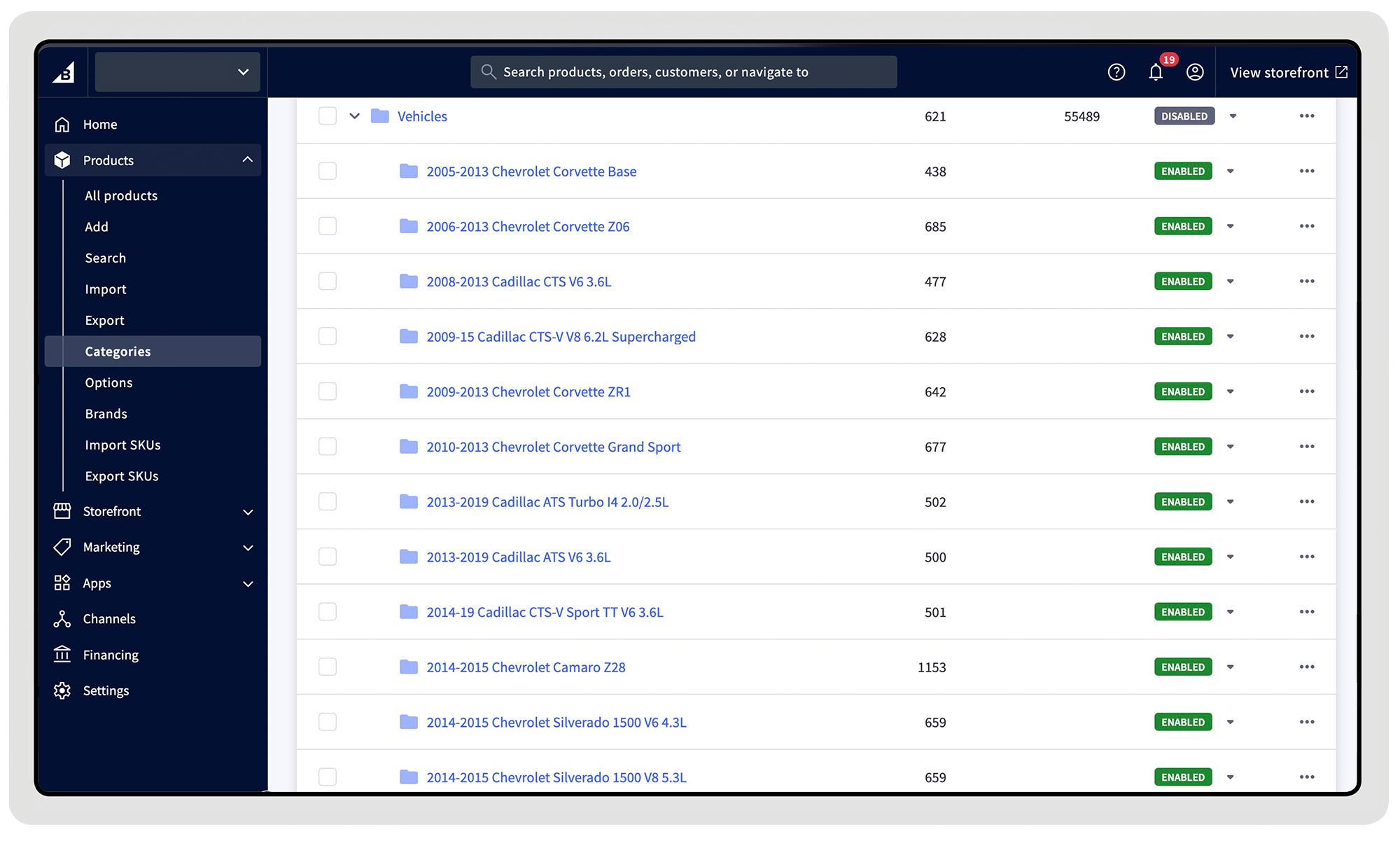
Landing Pages in the Dashboard show assigned products